
Scribe Studio
Batch-transcribe audio files locally using OpenAI Whisper AI. No internet connection. No subscription. No data leaves your machine.
Everything you need to transcribe audio at scale.
Whisper runs entirely on your machine. Your audio files never leave your computer — no cloud, no accounts, no data collection.
Queue up dozens of audio files and let Scribe Studio work through them automatically. Walk away and come back to finished transcripts.
Accepts MP3, M4A, WAV, and FLAC files. No need to convert your audio first — just drag it in.
Outputs subtitle files with accurate word-level timestamps — ready for video editors, publishers, and accessibility workflows.
Choose from tiny to large-v3 depending on your hardware. More VRAM = faster. CPU fallback always available.
Automatically uses your GPU if available. Falls back to CPU seamlessly. No configuration needed.
Get transcripts in four steps.
Download the installer from GitHub Releases. No Python, no command line — it just works on Windows.
Drag in your MP3, M4A, WAV, or FLAC files. Add as many as you need — Scribe Studio will queue them up.
Pick a Whisper model size. large-v3 gives the best accuracy. Smaller models are faster on older hardware.
Get SRT, VTT, or plain text output. Files go straight to your chosen output folder — no extra steps.
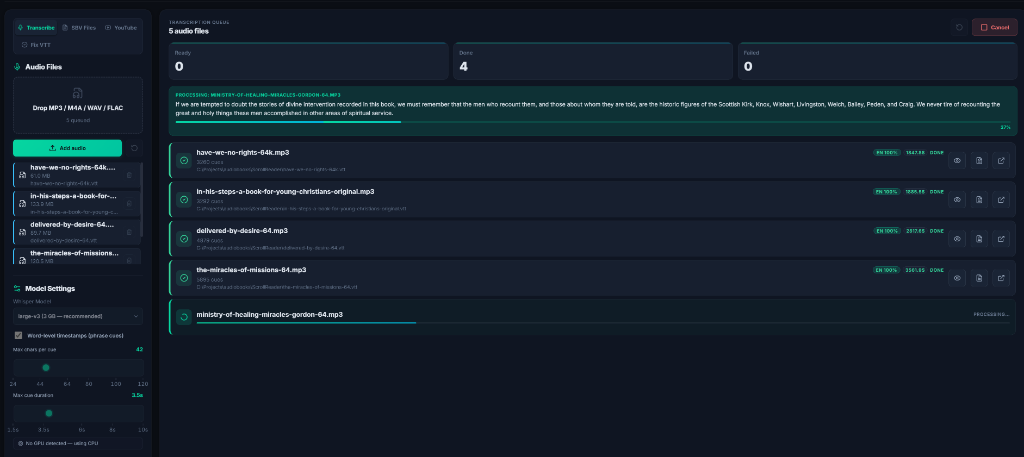
Clean, focused, built for bulk work.
What you need to run it.
- Windows 10 or Windows 11 (64-bit)
- 4 GB RAM
- 2 GB free disk space (for models)
- CPU-only transcription supported
- Internet not required after install
- Windows 10 or Windows 11 (64-bit)
- 8+ GB RAM
- NVIDIA GPU with 4+ GB VRAM
- CUDA 11.8+ installed
- large-v3 model for best accuracy
Ready to transcribe?
Free, open source, and always will be. Download for Windows now.