

Sermon Thumbnail Creator
Design simple, clean YouTube thumbnails for church sermons in seconds. No complex design tools needed—just drop in a photo, add your sermon title, and export.
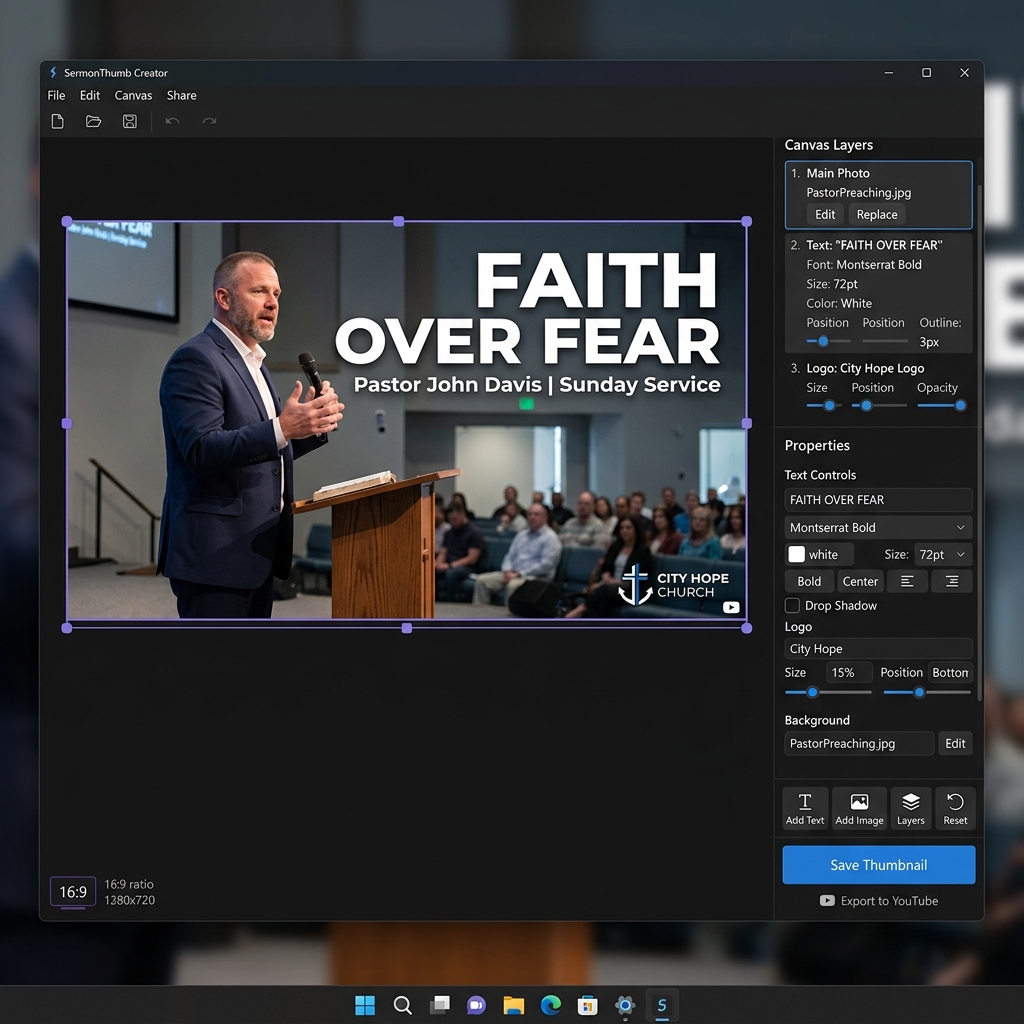
Everything a church needs for clean sermon thumbnails.
Canvas locked to the exact 16:9 ratio required by YouTube (1280x720) so you never have to crop later.
Add simple, bold text overlays for your sermon title and speaker name to catch viewer attention.
Easily drop your church logo transparent PNG into the corner of your design.
Drag and drop photos of the pastor preaching directly onto your canvas as the background.
Export your final composition as a high-quality, optimized JPG or PNG ready for immediate upload.
Fully open source and free to use forever for any church. No subscriptions or hidden fees.
Design your sermon thumbnail in minutes.
Start by importing a photo of your pastor preaching to serve as the foundation of your thumbnail.
Drop your church's logo into the corner of the design.
Drop in your sermon title text, customizing the font size and colors to match your church branding.
Save the final design and upload it directly to YouTube Studio.
A focused editor for simple, clean results.
Ready to design?
Free, open source, and always will be. Download for Windows now.