
YOUR FIRST VIDEO
MP3. SRT. Cover.
Let’s get it on screen.
Install the Windows app, activate your purchase, and render an MP4 you can upload to YouTube. This guide covers the version 1 workflow.
01 / INSTALL
Download from your account.
- Sign in to My purchases with the account used for the purchase.
- Under Audiobook to Video, choose the Windows download. Keep your serial code private.
- Open the downloaded installer, choose your installation folder and complete setup. Launch Audiobook to Video.
The current download is for compatible 64-bit Windows computers. macOS is planned and is not currently offered as a customer download.
02 / ACTIVATE
One serial, two computers.
- While connected to the internet, open Activate license in the app.
- Copy your license key from My purchases and paste it into Serial code.
- Choose Activate this computer. Check that the app reports the license as active.
After activation, your purchased version works offline. To move a license, use Deactivate this computer in the app, or deactivate the old computer in My purchases. You can then activate the replacement. A deactivated or refunded license is checked when the app reconnects.
Do not post your serial code in a support message or screenshot. Your account lists the computers using your license.
03 / ADD YOUR FILES
Bring the audio you already made.
For an ElevenLabs audiobook, start with the finished MP3, its matching SRT and your cover image. Audio-generation subscriptions are separate from this app.
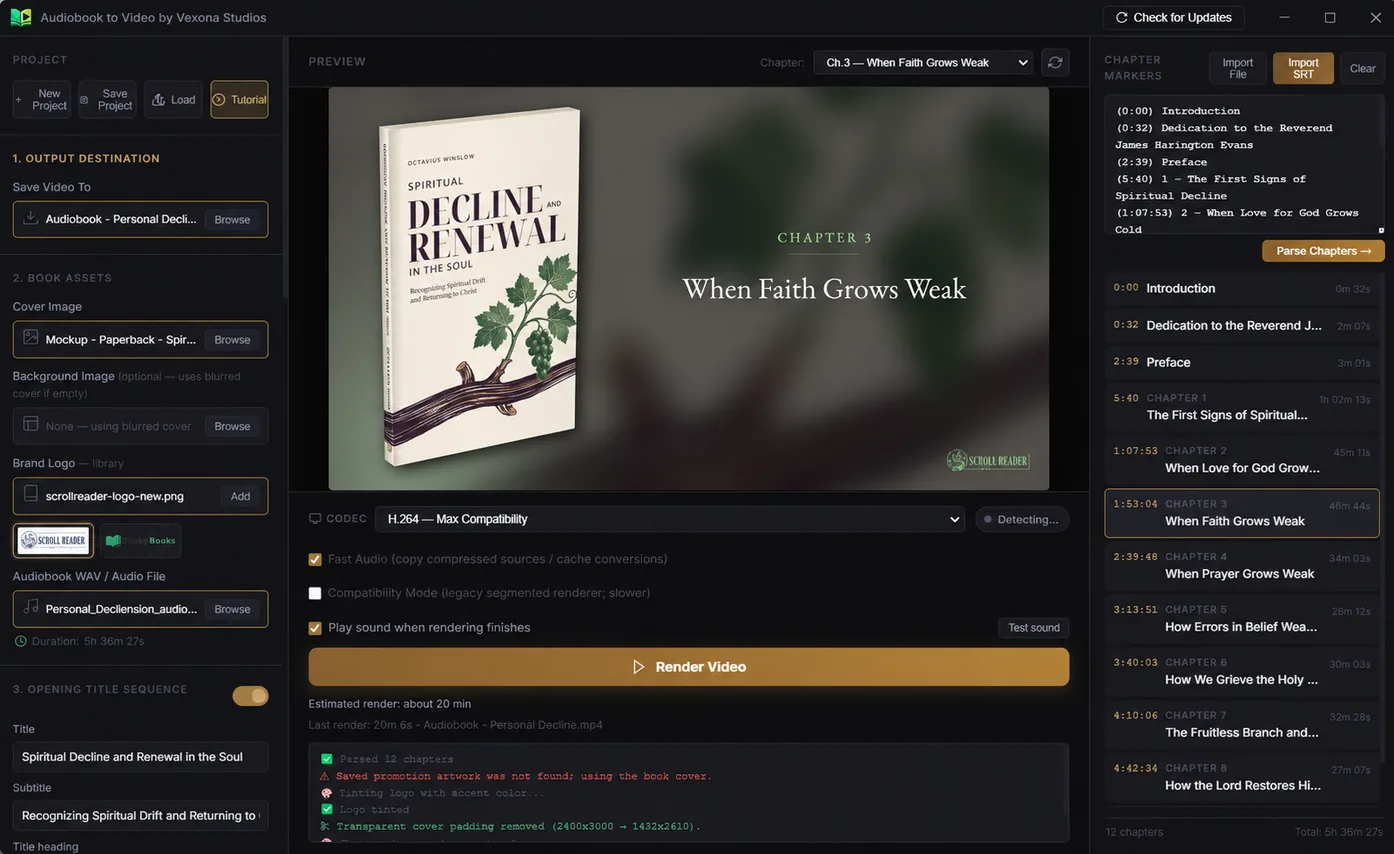
- Under Output Destination, choose Browse and a folder and filename for the MP4.
- Add your Cover Image and Audio File in Book Assets. The app also supports compatible WAV and M4A audio.
- Choose Import SRT in Chapter Markers. Review the chapter titles and times it detects; use Parse Chapters after editing markers.
- Check the preview. Leave the optional background, brand logo and opening titles at their defaults for a simple first render.
The SRT helps identify chapter headings and times. Recognition depends on the text in your SRT; if a heading is missed, edit its marker before rendering. It does not mean every subtitle cue becomes a chapter title.
04 / RENDER & SHARE
Make the MP4 on your computer.
- Check the chapter preview and output destination. Turn off Print Edition Promotion if you do not want that optional card.
- Choose the broadly compatible H.264 output option, then Render Video.
- When rendering finishes, choose Open Video. Watch the beginning, a chapter change and the end; listen for the correct audio.
- Upload the completed MP4 to YouTube yourself. Add your title, description, thumbnail and publishing settings there.
Rendering time depends on the recording length, your computer and your settings. Keep the original MP3, SRT, artwork and saved project so you can revise the video later.
For publishing guidance, see ElevenLabs audiobook to YouTube. Chapter titles inside the video and YouTube’s clickable description chapters are separate.
Keep your purchased version up to date.
Windows releases from 1.2.27 check for included updates on startup and periodically while online. The app downloads and verifies a compatible update, then offers Restart & Install. Save your project first; installation waits until your render is finished or canceled. Your activation and saved projects are kept.
Use Check for Updates to check manually. An older 1.2.22 installation needs one normal upgrade from My purchases to gain automatic downloads. Updates stay within your purchased major version; a future major upgrade is optional. Your activated version still works offline when update checks cannot connect.
IF SOMETHING GETS STUCK
A few things to check.
My purchase or download is missing.
Use the same sign-in method as at checkout. Payment must be confirmed before downloads appear. Request a fresh download link from My purchases if an earlier one expired. Recover purchase access if you lost your original account.
Activation says both computers are in use.
Open My purchases, review the device names and deactivate the computer you no longer use. Try activating the new computer online. If the list looks wrong, contact support with the order reference, not the serial code.
The SRT did not find the right chapters.
Use the SRT that matches the final audio. Check that its headings and times correspond to your recording. Edit or add the missed chapter markers and choose Parse Chapters, then inspect the preview again.
Rendering fails or the video does not play.
Check that the output folder is writable and your drive has space. Try a short recording with H.264 first. Include your app version, Windows version, error text and the stage that failed in a support request. Do not include private book files unless you choose to share them through email.
Need a hand?
Ask a question, report a bug or suggest an improvement. Your conversations stay in Help & messages; return there for replies. Automatic support emails are not connected yet.