Find the right screen with Ask Grace
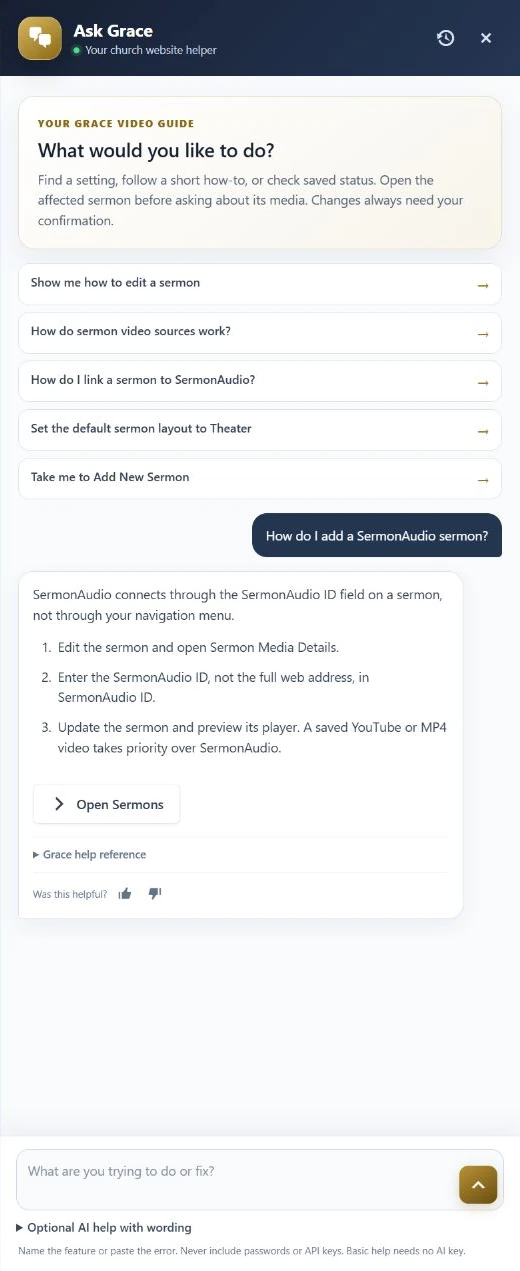
- Open Ask Grace from the WordPress toolbar or bottom-right launcher.
- Name the feature and what you want to do, such as “How do I add a SermonAudio sermon?”
- Follow the short steps and use the destination button to open the relevant screen.
- For saved media diagnostics, open the affected sermon before asking. Unsaved changes and remote playback are not checked.
Ask Grace is a product guide, not an unrestricted chatbot. Review any proposed setting change before confirming it; never paste passwords or API keys.
Questions that help it help you
- “Where do I change Wednesday prayer details?”
- “How do I add a SermonAudio sermon?”
- “Why is this sermon's thumbnail out of date?”
- “Where do I change the homepage layout?”
Open the affected sermon before asking about its saved media. Describe one task and include the exact error, not passwords, API keys, private pastoral content, or signed callback URLs.
Local help and saved-state diagnostics do not prove remote playback or mail delivery. Optional AI wording assistance is off by default and sends a bounded question/catalog context to the selected provider, not saved sermon content or diagnostic values. Ratings do not automatically rewrite answers. See privacy and limits.