Name and reorder gatherings and explain monthly variations without publishing private addresses.
Updated · Theme 1.8.92
Where to go
Theme Options → Service & Location
Before you start
Permission to edit theme options; Core for shared church settings.
How changes save
Save All Options after adding, editing, deleting, or reordering rows.
Add service names, times, and public notes
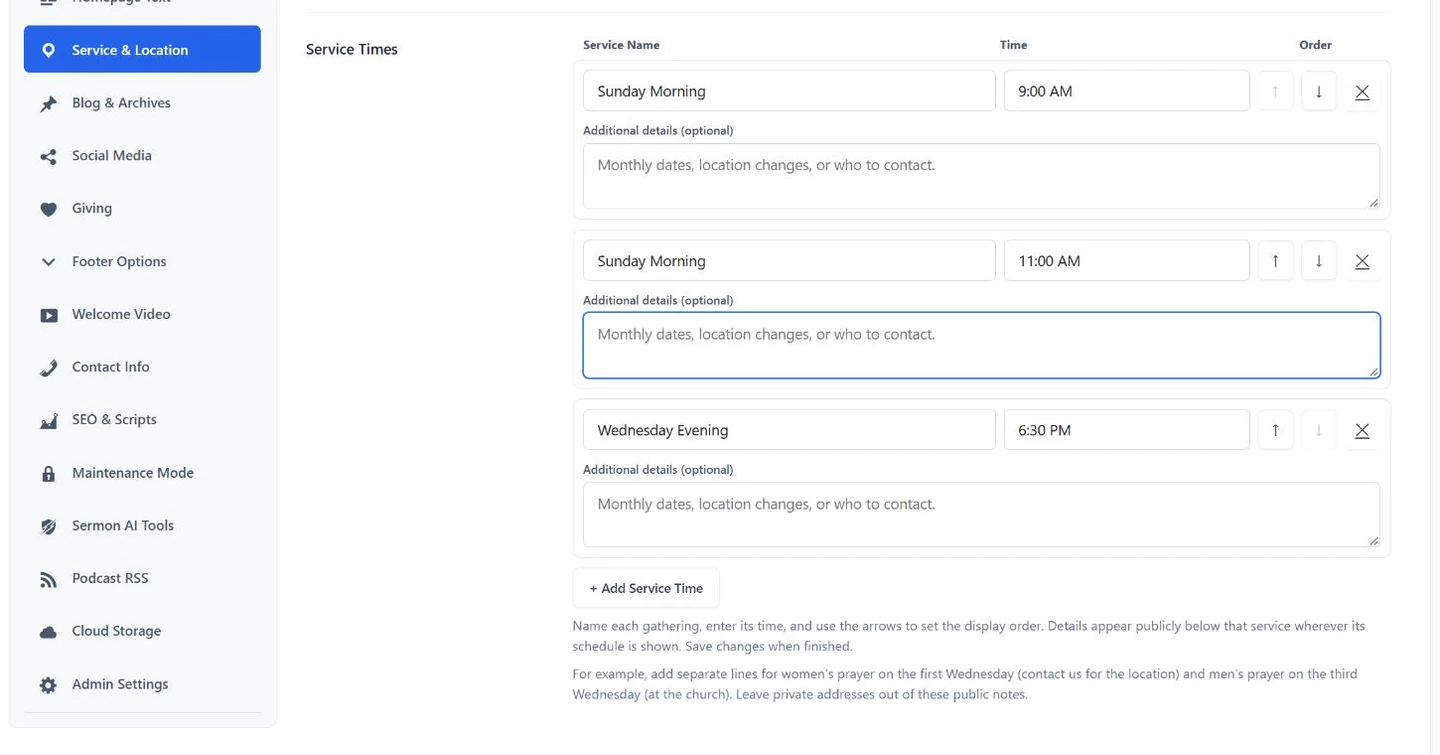
Open Theme Options > Service & Location. Each gathering has a name, time, order buttons, and an optional Additional details field.
123Service Times: add monthly variations or “Contact the church for the location” under Additional details. Notes appear publicly beneath the gathering. Save All Options when finished.
Name each gathering.
Set its time; use the arrows to change order.
Add public notes for monthly dates or location instructions.
Example: a monthly prayer schedule
Under Wednesday Prayer, Additional details could say:
Women's prayer: first Wednesday — contact the church for the location. Men's prayer: third Wednesday — at the church.
These are public explanatory notes, not an automated calendar recurrence rule. Keep private home addresses out of the field. The main Church Address controls directions and maps; a blank address hides location output instead of inventing one.
Check the result
The saved schedule and notes agree across the homepage, menu, footer, and Plan a Visit page.
Screenshots show a fictional demo. Select one to enlarge it. Preview artwork is not included in the customer theme; illustrations need an internet connection.