The ThemeForest download is a package containing the installable theme ZIP, child theme, license, and this documentation. Extract that outer package first.
WordPress Installation
- Navigate to Appearance > Themes in your WordPress dashboard.
- Click Add New and then Upload Theme.
- From the extracted ThemeForest package, choose
grace-video.zipand click Install Now. - Once installed, click Activate.
- Grace Video opens Theme Setup with three sections: your homepage, church details, and sermons. There is no required tour or setup-path choice.
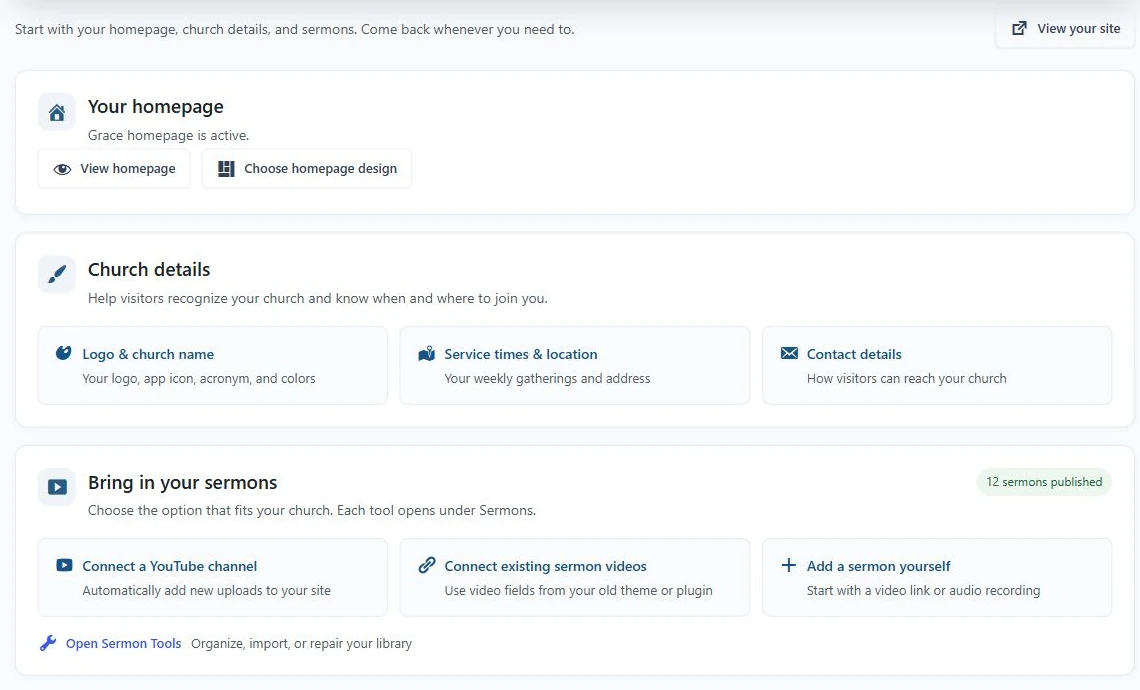
- Choose the homepage design.
- Enter your church identity and public details.
- Choose the sermon workflow that fits your existing content.
FTP Installation
- Extract
grace-video.zip. - Upload the resulting
grace-videofolder to/wp-content/themes/via FTP. - Log in to your WordPress admin, go to Appearance > Themes, and activate the theme.
Which plugins do I need?
| Component | Needed for | Required? |
|---|---|---|
| Grace Church Core | Sermons, series, events, staff, ministries, church settings, and Ask Grace | Yes, for church-content features |
| Grace Church Bible | The included Bible reader | Optional |
| Sermon AI Tools | AI-assisted text, SEO, and series covers | Optional; your own provider key and billing may be needed |
| Classic Editor | A classic editing interface | Optional; core blocks are supported |
Grace Video uses a local companion plugin for church-specific content. No external download is required for the bundled plugins.
- Open Theme Setup.
- If Core is missing, use Enable your church features to install or activate it.
- Return to Theme Setup when installation finishes. The sermon connection choices become available.
- Install Classic Editor, Grace Church Bible, or Sermon AI Tools only if your church needs those optional workflows.
Hosting requirements
The package requires WordPress 6.4+ and PHP 7.4+. These are minimum compatibility declarations, not recommended security lifetimes. Use a currently supported PHP version compatible with your full plugin stack. HTTPS is required for secure integrations and browser installation.
Suggested hosting limits: 256 MB PHP memory, 64 MB upload/post size, and 300-second execution time for import workflows. Ask your host to assess these settings; do not expose configuration files.
The demo has been checked on WordPress 7.1.3. PHP regression checks cover the release's CI matrix; that does not certify every host, plugin, or physical device.